SmartNudge
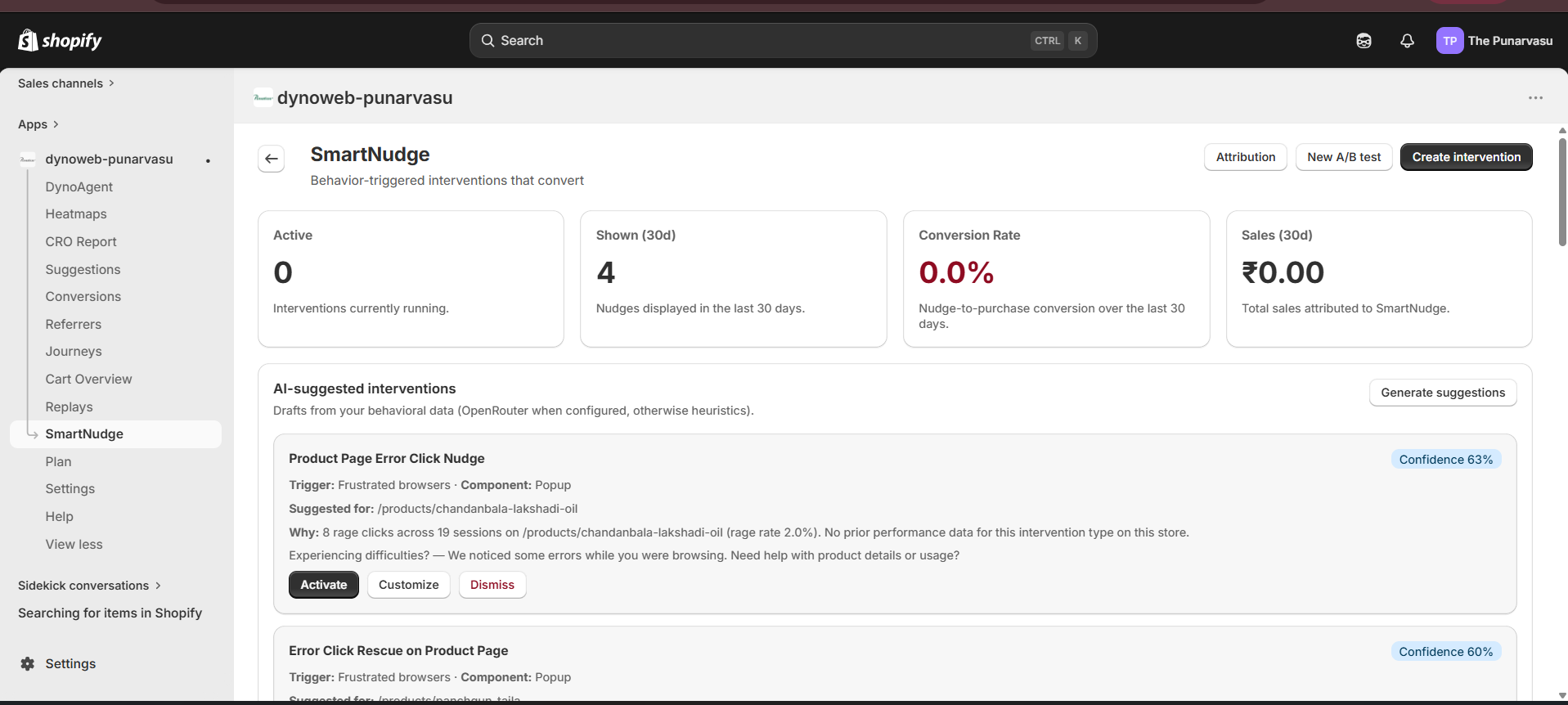
SmartNudge turns visitor behavior into on-site nudges — popups, bars, wheels, and more — styled to your brand, delivered on-site and by email, and measured against a control group.
SmartNudge is where DynoWeb crosses the last mile: instead of just telling you a fix, it deploys it. You build behavior-triggered on-site messages — popups, bars, wheels, quizzes, and more — that recover abandoning shoppers, grow your email list, and lift average order value. Every nudge is styled to your brand automatically, and every nudge is measured against a control group so you know the real revenue it earned.
What it does
SmartNudge has two connected parts.
The intervention list shows every nudge you've created, its status (active, paused, or draft), and its performance — impressions, clicks, and the net revenue it produced. AI-suggested nudges also appear here for you to review; nothing fires on your storefront until you activate it.
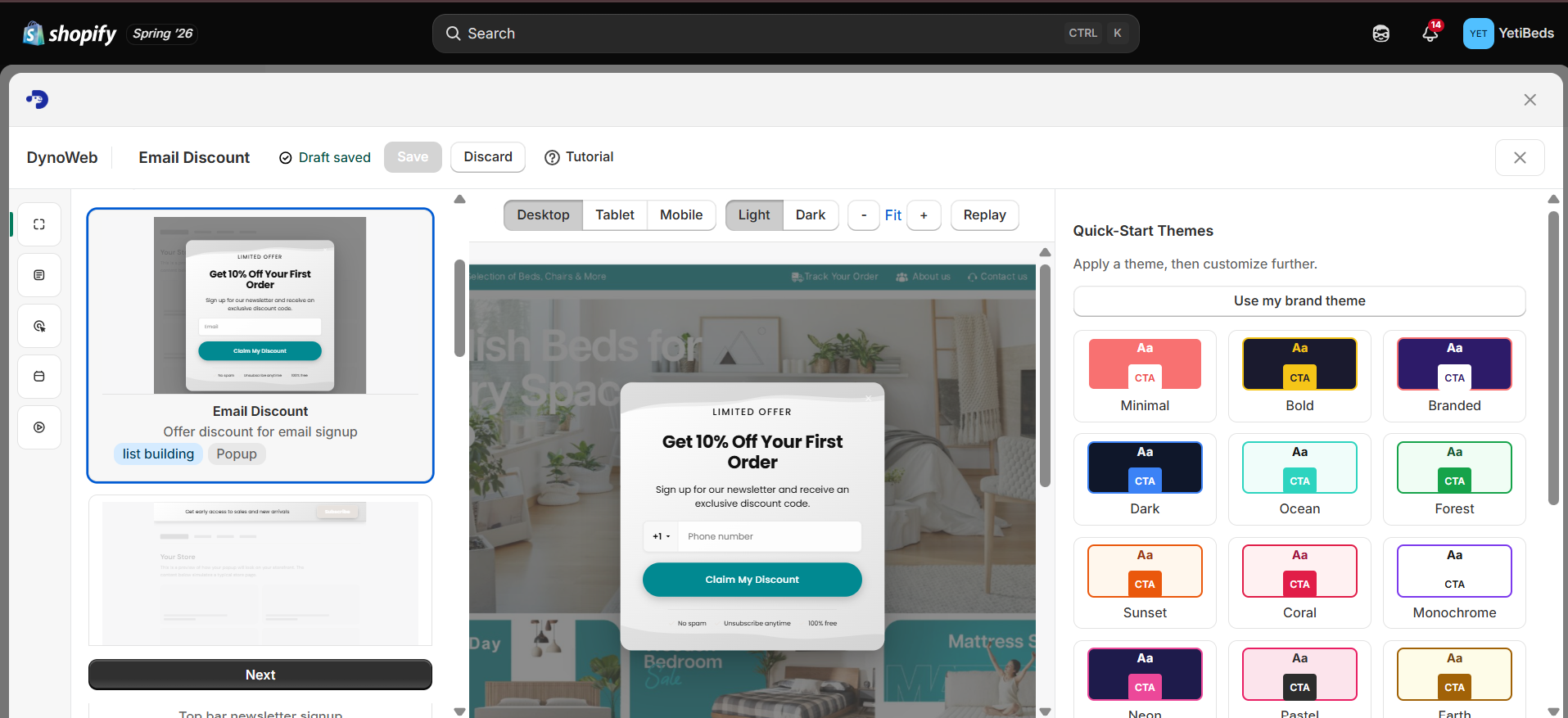
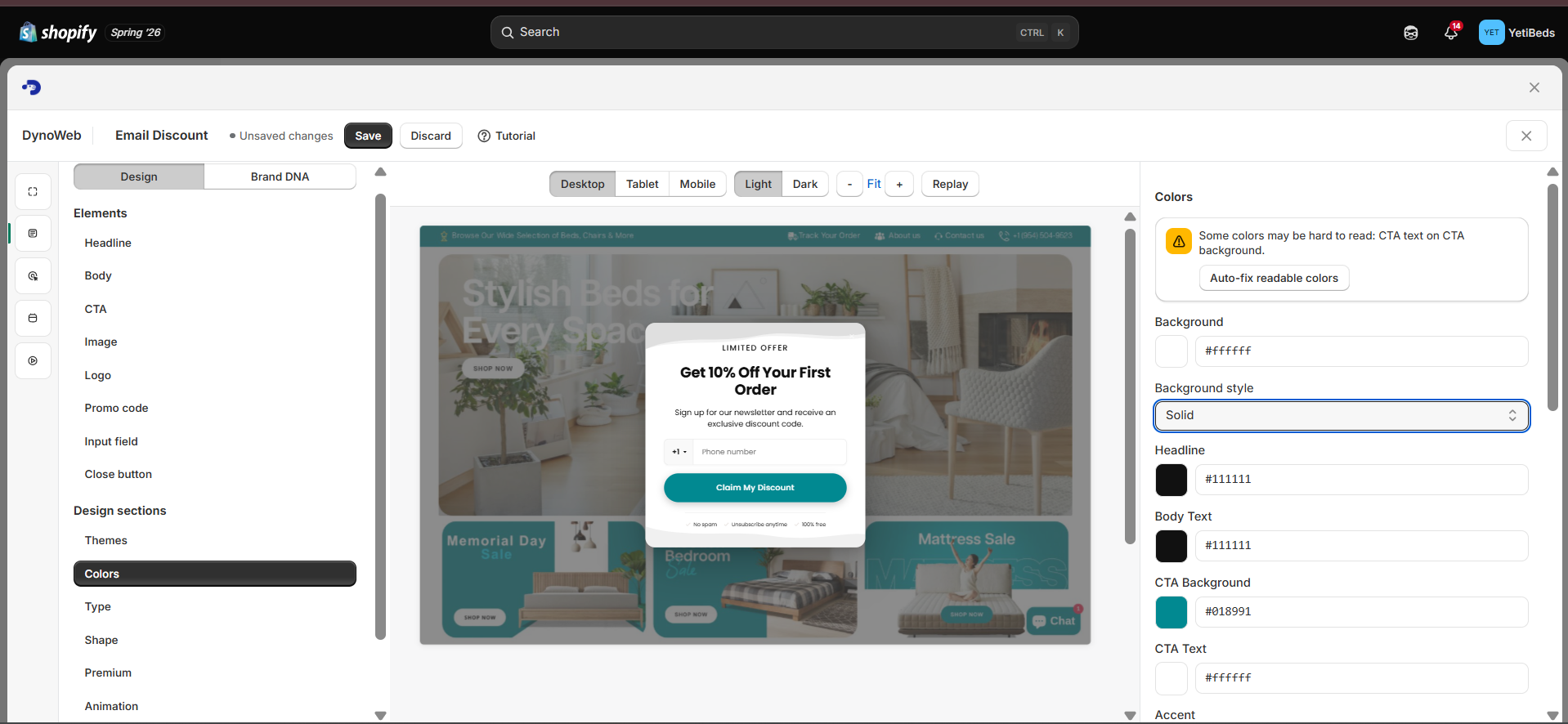
The builder is a live-preview workspace. As you move through Template → Content → Trigger → Delivery → Launch, a preview of your nudge updates in real time beside you, so you always see exactly what shoppers will see.
Nudge types
SmartNudge ships 16 nudge types, so you can match the format to the goal:
| Type | Best for |
|---|---|
| Promotional popup | Offers, discounts, announcements |
| Exit-intent rescue | Winning back visitors about to leave |
| Sticky announcement bar | Always-visible promos or shipping thresholds |
| Free-shipping progress bar | Nudging carts over the free-shipping line |
| Floating cart nudge | Reminding shoppers what's in their cart |
| Fullscreen takeover | High-impact welcome or campaign moments |
| Side message | Subtle, non-blocking prompts |
| Social proof toast | "Someone just bought…" style trust prompts |
| Countdown timer | Urgency for sales and drops |
| Product badge | Bestseller / low-stock style callouts |
| Combo / bundle suggestion | Upsells and "frequently bought together" |
| Spin-to-win | Gamified email capture with a prize wheel |
| Scratch card | Gamified reveal offers |
| Multi-step form / quiz | Guided lead capture and product finders |
| Email capture | Simple list-building popups |
| Video popup | Product or brand video moments |
To start fast, the template gallery offers 30+ ready-made starters across list-building, cart recovery, upsell, exit-intent, seasonal, social proof, announcements, welcome, gamification, and celebration — pick one and customize.
Brand DNA — nudges that look like your store
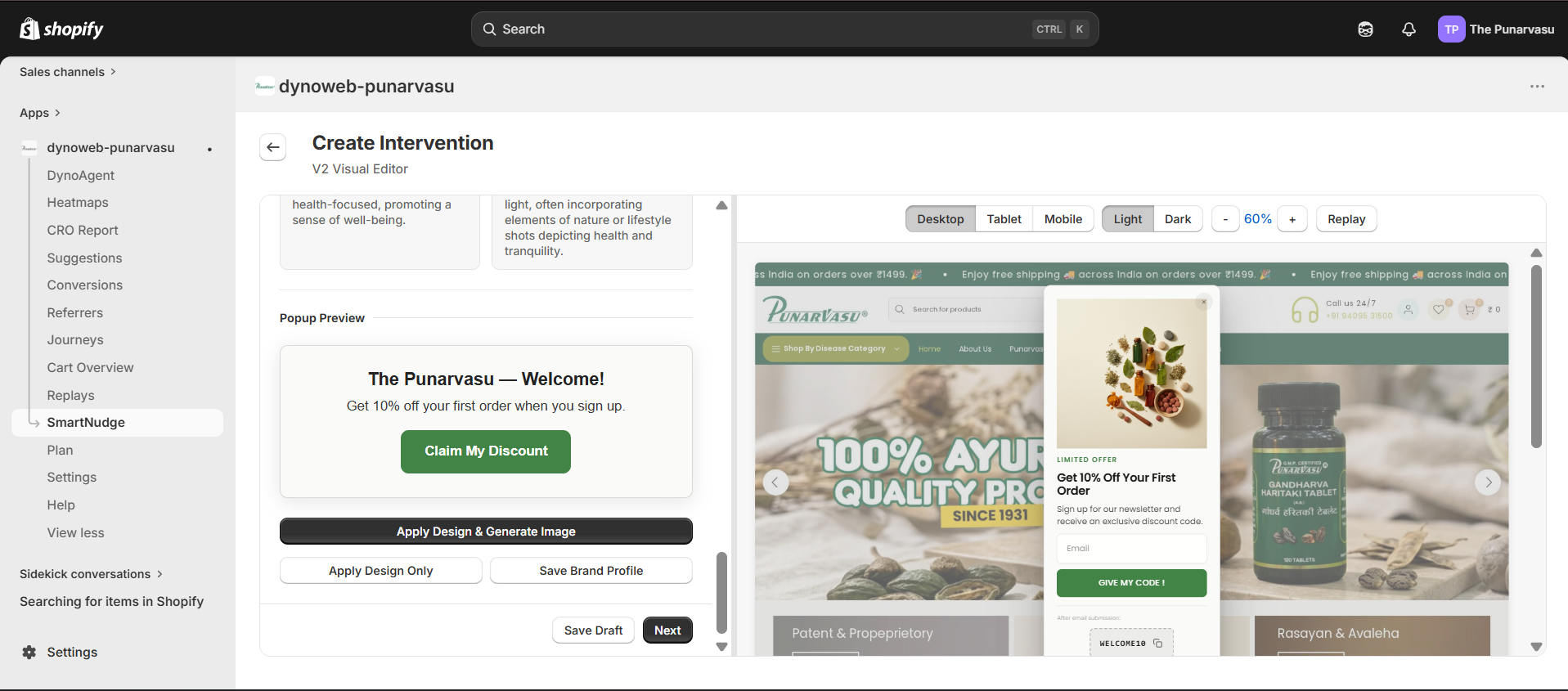
Before you design anything, SmartNudge can learn your brand. Brand DNA crawls representative pages of your storefront and extracts:
- Your color palette (background, text, headline, CTA, accent, and more)
- Your fonts (headline and body, matched to fonts that actually load on your store)
- Your brand personality and voice (tone, adjectives, words to use and avoid)
- Your imagery style and logo
Extraction takes around 30 seconds. From then on, every nudge you build inherits these design tokens, so it looks native to your store out of the box — no manual styling required. You can save multiple brand profiles per store and edit any field after extraction.
Festival & seasonal designs
SmartNudge also includes ready-made festival and seasonal designs covering both global and regional moments — Diwali, Holi, Onam, Dhanteras, Raksha Bandhan, Eid, Christmas, Halloween, New Year, Valentine's, Black Friday / Cyber Monday, Mother's and Father's Day, Back to School, and more.
You pick one from the design library while building a nudge — open Browse designs and choose the festive look you want. Each festival comes in a few style levels, from a clean festive card to a richer, ornamented layout with hero artwork, up to a premium editorial look — so you can dial the styling up or down for the occasion.
Festival designs blend with your Brand DNA intelligently: the festival sets the colors and ornament, while your brand keeps its fonts and button style — so it feels seasonal and on-brand.
Building a nudge
Open the builder and you'll move through five steps, with a live preview updating beside you the whole time:
- Template — start from a ready-made template or a blank component type.
- Content — write your headline, body, and CTA (or generate them with AI), pick or generate an image, and apply your Brand DNA and design.
- Trigger — choose who sees the nudge and when: a visitor segment (exit intent, cart abandoner, price hesitator, high-intent browser, and more), plus frequency and target pages.
- Delivery — choose how it reaches shoppers: on-site, and — when the nudge captures an email — a follow-up coupon email (see below).
- Launch — review and activate.
AI copy and images
- Write with AI — draft headline, body, and CTA copy matched to the nudge type, your brand voice, and the trigger context. It's a starting draft you can edit freely.
- Generate images with AI — create brand-matched product and background images, with a built-in background remover so product shots drop cleanly onto any design.
AI generation is quota-based and scales with your plan.
Delivery: on-site and email
SmartNudge reaches shoppers two ways:
- On-site — the nudge renders on your storefront through DynoWeb's lightweight widget, triggered by real behavior (exit intent, scroll, time on page, cart value, and more).
- Email — when a shopper enters their email in a nudge, DynoWeb can send them a coupon email that inherits the same design as the popup, so the follow-up feels like a natural continuation of the offer.
Attribution — proof, not guesswork
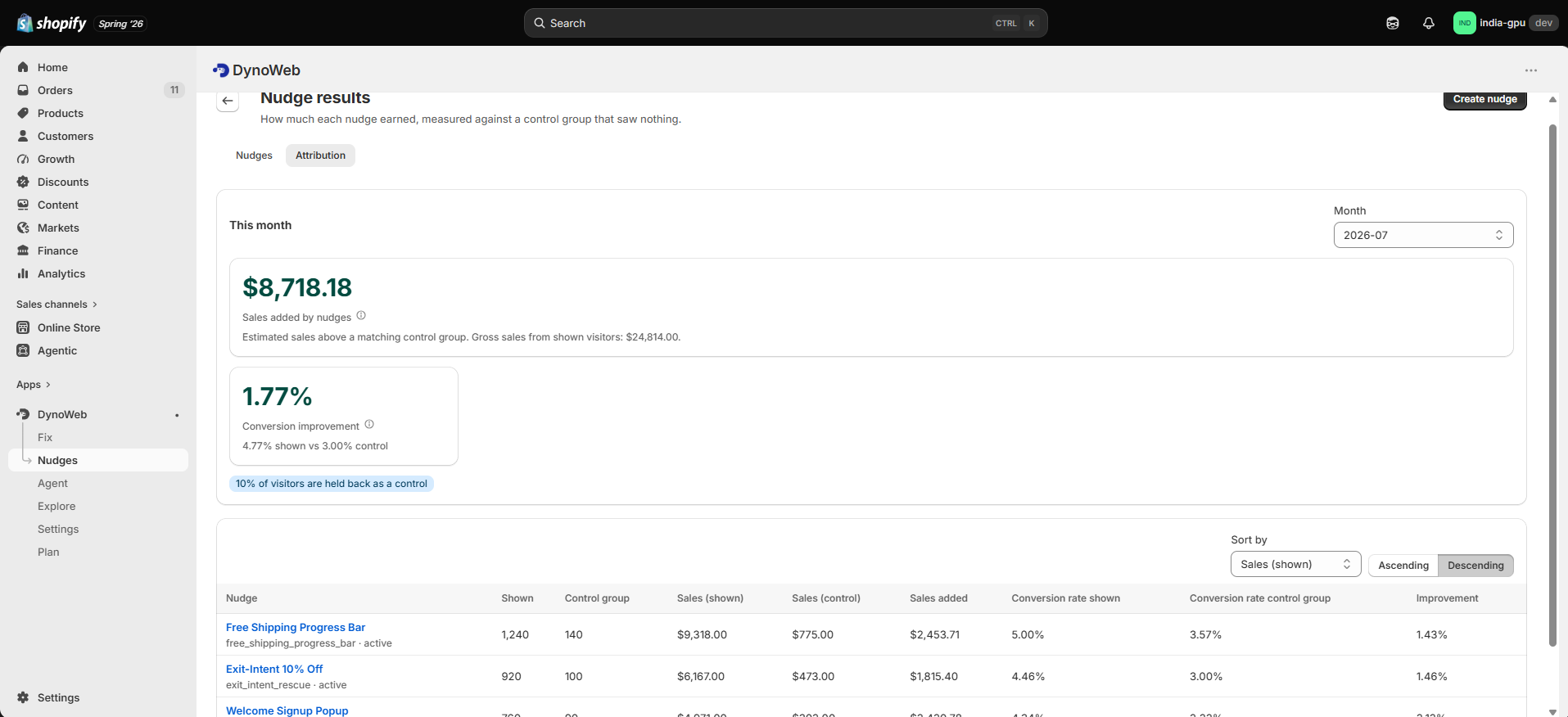
This is what sets SmartNudge apart. Every nudge runs against a control group (a default 10% holdout who don't see it). SmartNudge then compares the two groups and reports:
- Lift — the difference in conversion rate between shoppers who saw the nudge and the holdout.
- Incremental revenue — the net extra revenue the nudge produced, after normalizing the holdout to the same size and subtracting it out.
To keep things honest, SmartNudge waits until there's enough data before showing a precise percentage — below that threshold it tells you the result is still forming rather than quoting a number it can't stand behind. You'll find this under Nudges → Attribution.
A/B testing
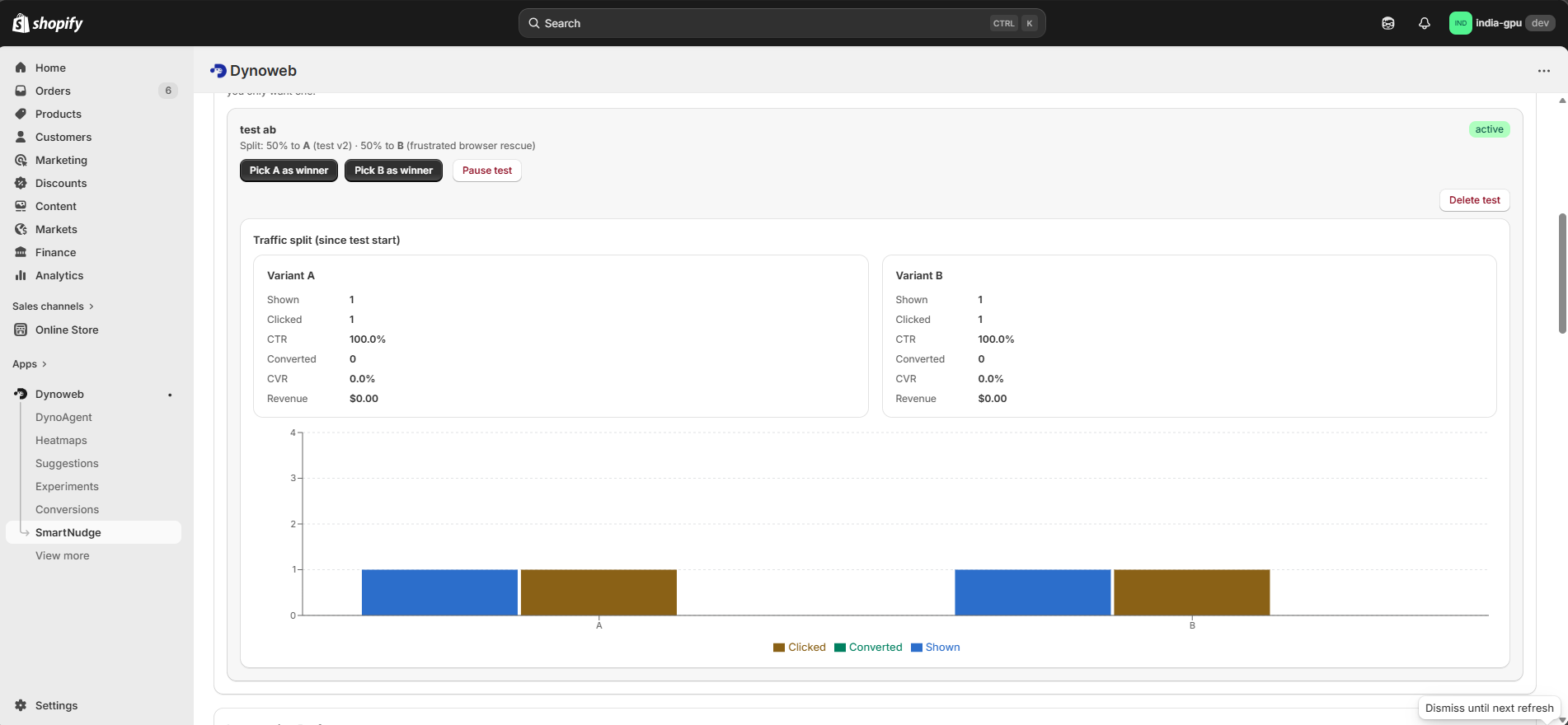
Run two variants head-to-head — different copy, component, or trigger timing. You set the traffic split, DynoWeb assigns visitors, and a statistical test recommends the winner once results are significant. Use A/B tests to validate a clear hypothesis, not to go fishing.
The Suggestion → Nudge loop
DynoWeb connects the problem to the fix. When a revenue leak surfaces in your Suggestions or CRO Report, you can answer it directly with a nudge. Once that nudge starts winning against its holdout, the original leak is marked "acted on — working," and DynoWeb shows you the money it earned.
Plans and limits
The number of live nudges, AI copy and image generations, and Brand DNA extractions you can run each month scale with your plan. See the Plan page for the limits on each tier.
FAQ
Do I need to be a designer? No. Brand DNA styles nudges to your store automatically, and every template is ready to publish.
Will nudges slow down my store? No — nudges render through DynoWeb's lightweight, async storefront widget.
How do I know a nudge is actually working? Every nudge is measured against a holdout control group, and Attribution shows the net revenue it earned — not just clicks.
Can DynoAgent build a nudge for me? Yes. Ask DynoAgent to create, write, and launch a nudge — you approve before it goes live.
Need help? Email us at help@dynoweb.app.
Previous
Errors
Errors surfaces the JavaScript errors and broken 404 pages firing on your storefront — grouped, ranked by how often they hit, and tagged with a plain-English fix for each one.
Next
DynoAgent
DynoAgent is your AI CRO expert inside DynoWeb — analyze your store, find the fixes that matter, and apply them in Shopify with your approval.