Errors
Errors surfaces the JavaScript errors and broken 404 pages firing on your storefront — grouped, ranked by how often they hit, and tagged with a plain-English fix for each one.
Every storefront has errors the merchant never sees: a script that quietly fails on the product page, a link that 404s on mobile, a checkout button that throws for a slice of visitors. They don't show up in your sales report — they just leak revenue. The Errors page surfaces them, grouped and ranked, and tells you in plain English what to do about each one. You'll find it under Fix → Errors & 404s.
What it catches
DynoWeb watches your live storefront and records two kinds of problem:
- Page errors — JavaScript errors thrown in real visitors' browsers, captured with the message, the page they fired on, and how many times they hit.
- 404s (Not Found) — broken pages visitors landed on, along with where they came from so you can find and fix the bad link.
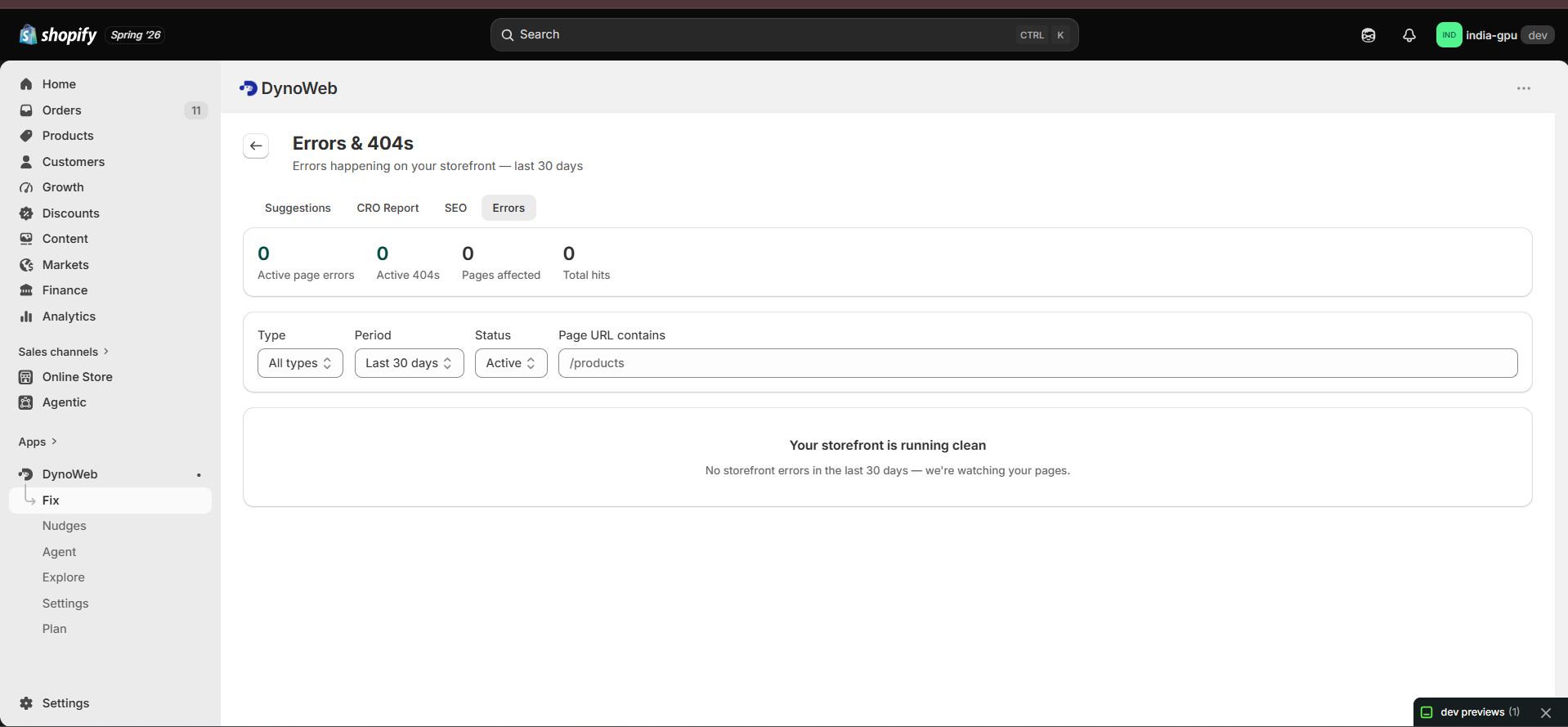
The top of the page gives you the at-a-glance count: active page errors, active 404s, pages affected, and total hits across the period. Zero errors reads as good news, not an alarm — a clean storefront is something you earned.
Grouped and ranked, not a raw log
Errors aren't dumped as a firehose. DynoWeb groups identical errors together and ranks them by hit count, so the thing breaking most often for the most visitors sits at the top. Each row shows the type, the message, the page it fires on, the source (an internal link, another page, an external site, or direct traffic), when it was last seen, and whether it's still active or resolved.
Filter by type (page errors vs 404s), time period (last 7 / 30 / 90 days), status (active or resolved), or page URL, and sort by hits or recency to work down the list.
A plain-English fix for every error
This is what makes Errors different from a developer console. Open any error and DynoWeb tells you who should fix it and how — it triages each one into a lane:
- Fixable in Shopify admin — most 404s. DynoWeb hands you the exact path and a one-click "Create redirect in Shopify admin" so you can fix it yourself in seconds.
- Caused by an app — DynoWeb points you at the responsible app and links straight to its support.
- Needs a developer — DynoWeb writes a self-contained developer brief (not a bare stack trace) you can copy and hand off, so your dev can act on it directly. No developer? It links you to Shopify experts.
The full stack trace is still there, tucked behind a "Show technical details" disclosure for whoever needs it — never in your face.
See exactly what the visitor experienced
Each error lists where visitors came from — the linking page, the element, even the selector for a bad internal link so it can be found and removed — and the recent sessions that hit it. From there you can jump straight into a session replay and watch what the shopper did right before and after the error fired.
Resolve and move on
Fixed something? Mark it Resolved and it drops off your active list — reopen it later if it comes back. And because DynoAgent shares this data, you can simply ask it to find and help resolve your storefront errors without opening the page at all.
FAQ
Do I need to add anything to my theme to catch errors? No. Error and 404 tracking is part of the DynoWeb tracker you already installed — nothing extra to add.
Will it show me every tiny error? It groups and ranks by hit count, so the errors hurting the most visitors surface first — you're never sifting a raw log.
I'm not technical. Can I actually fix these? Many, yes — most 404s are a one-click redirect in your Shopify admin. For the ones that need a developer, DynoWeb writes the brief so you can hand it off cleanly.
Can DynoAgent handle errors for me? Yes — ask it to find storefront JavaScript errors and broken pages, and it'll help you resolve them.
Need help? Email us at help@dynoweb.app.
Previous
SEO Autopilot
SEO Autopilot finds SEO gaps across your whole store and fixes them with AI-written content, applied in one click through Shopify's Admin API — fully reversible.
Next
SmartNudge
SmartNudge turns visitor behavior into on-site nudges — popups, bars, wheels, and more — styled to your brand, delivered on-site and by email, and measured against a control group.